
Bond Home
Olibra LLCHouse & Home
4.71.12K Reviews
- Version
- 2.64.3-master1
- Installs
- 100.00K
- Age Rating
- Everyone
Screenshots
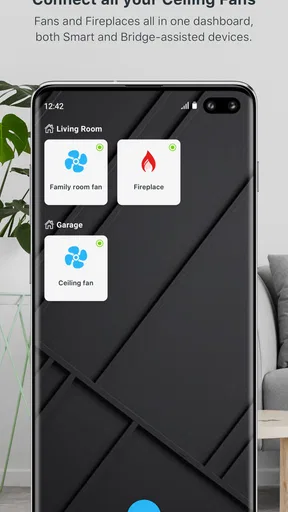
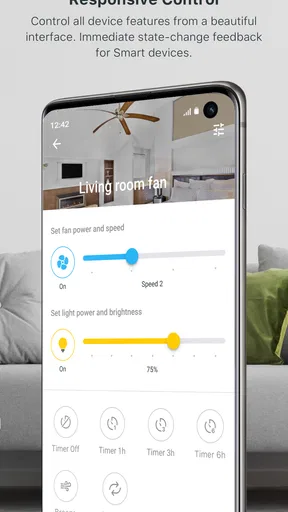
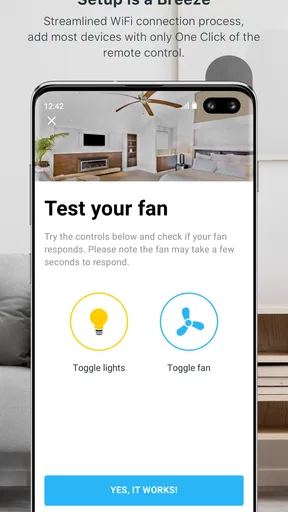
Our Review of Bond Home
 Analysis by Appyee
I approached Bond Home as a practical house-and-home app rather than something to browse casually. Its purpose is easiest to understand when you think about everyday control: you have compatible home equipment, you want one place to reach it, and you would rather not move between several separate apps. That sounds simple, but the real question is whether centralizing control makes your routine easier or merely adds another layer to manage.
After spending time with it, my view is that Bond Home is most appealing to people who already have a supported setup and want a cleaner way to interact with it. It is free, rated for Everyone, and comes from Olibra LLC. The app has built a solid audience, with an average rating of 4.7 from around 2.1 thousand ratings and more than 100 thousand installs. Those figures do not replace personal testing, but they do suggest that the basic idea is working for many households.
How I would decide whether Bond Home belongs in your setup
The first decision is not the interface; it is compatibility. A home-control app can look polished and still be the wrong choice if your equipment is not supported or if your household relies on a different ecosystem. I would begin by listing the devices I actually use every week, then checking whether Bond Home can handle the specific ones that matter most. There is little value in controlling one rarely used item while the central equipment remains scattered across other apps.
The second criterion is convenience during ordinary moments. I think about situations such as settling down for the evening, adjusting a room without getting up, or managing equipment when the physical control is not close at hand. If the app reduces those small interruptions, it earns its place. If opening it feels slower than reaching for the original control, the centralization becomes less convincing.
The third criterion is who else needs to use it. A system that works well for one technically confident person may be frustrating for a partner, child, guest, or older relative. Bond Home makes the most sense when the people sharing the home are comfortable with app-based control and agree that one digital access point is preferable to several dedicated controls.
I would also consider how much change you are willing to introduce. If your current arrangement already works, moving to a new controller has a cost in time and attention even when the app itself is free. You may need to learn a new layout, establish habits, and explain it to everyone else in the home. That is why I would not install it simply because “smart home” sounds attractive. I would install it to solve a specific annoyance.
The everyday experience is about reducing small interruptions
A realistic use case is a living room where the relevant equipment is not always controlled from the same spot. Instead of searching for a physical control or remembering which manufacturer’s app handles which item, I can open Bond Home and try the central route first. The benefit is not dramatic every time. It is the accumulation of small conveniences: fewer objects on the coffee table, fewer apps to remember, and less time spent wondering which control does what.
I found that the best way to judge this kind of app is to use it during a normal routine rather than perform a single setup demonstration. Try it when you are tired, when the room is dark, or when you are already carrying something. Those are the moments when a control app either feels natural or exposes its friction. If the first action is obvious and the response is predictable, the app becomes part of the home instead of another project.
One useful habit is to keep the app’s role narrow at first. I would start with the room or equipment I interact with most, learn how Bond Home behaves there, and only then expand. This makes troubleshooting easier and gives me a fair comparison with the original controls. It also prevents the common mistake of reorganizing the entire home before knowing whether the central workflow suits me.
Where Bond Home makes the strongest case
The clearest strength is consolidation. In the house-and-home category, many alternatives are built around a single manufacturer, a particular type of equipment, or a broader platform that expects you to build an entire ecosystem around it. Bond Home is attractive when your priority is a straightforward control layer rather than a commitment to one brand’s wider product family.
That distinction matters. A manufacturer’s own app may offer the deepest access to its equipment, but it can leave you with several separate destinations when your home contains products from different sources. A broad smart-home platform may provide more elaborate routines or integrations, but it can also feel oversized if all you want is dependable access to everyday controls. Bond Home sits in a useful middle ground for people who value a focused home-control experience.
I also like the psychological simplicity of having one starting point. Even when an app does not eliminate every other control method, it can give household members a shared place to begin. That is particularly useful when visitors or less technical users do not know which original app is associated with which piece of equipment.
Another practical insight is that centralization can expose poor organization in the home. Once controls are brought together, it becomes easier to notice which equipment is used often, which controls are redundant, and which rooms create the most friction. I would use that information before buying anything else. Sometimes the best result of installing Bond Home is not adding more smart features, but realizing that a simpler arrangement is enough.
The app is also easy to consider because it is free. There is no purchase decision at the download stage, which makes a compatibility test less risky financially. Still, “free” should not be confused with effortless. Your time, setup work, and willingness to change routines are the real investment, so I would judge the app by the minutes it saves after the initial learning period.
Small workflow choices that make a difference
I recommend treating the first setup as a mapping exercise. Think in terms of rooms and routines rather than only device names. A label that makes sense to you at installation may be unclear to someone else later. Clear, familiar naming is especially important when several controls perform similar jobs.
I would also test the app from the places where I actually use it, not only from beside the equipment. A control that feels convenient during setup may be less useful from a sofa, bed, hallway, or kitchen. This is a non-obvious but important trade-off: the value of a remote control app depends on the distance and context in which you reach for it.
Another tip is to keep the original controls available during the transition. Do not put them away immediately. If Bond Home behaves differently from what you expect, the physical alternative lets you continue your routine while you learn. After a few days, you will know whether the app is genuinely replacing effort or simply adding a second method.
Finally, pay attention to household language. If one person calls something “the bedroom control” and another calls it by a technical product name, confusion can appear even when the app works correctly. I would settle on names that describe the room and purpose in plain language. That small decision often matters more than a visually impressive interface.
When another approach may fit better
Bond Home is not automatically the best answer for every smart-home situation. If you use only one manufacturer’s equipment and its official app already gives you everything you need, staying with that app may be more efficient. The official option is often the natural choice when you want the most direct relationship with a single product line and do not need cross-device consolidation.
A broader home platform may be a better fit for someone building a large, interconnected system. If your main interest is coordinating many kinds of equipment through elaborate routines, voice control, sensors, or a wider household automation strategy, a general ecosystem may offer a more suitable foundation. I would not choose Bond Home expecting it to replace every possible smart-home tool.
On the other hand, a dedicated physical control can remain preferable for some people. It is immediate, familiar, and does not require finding a phone. If your household includes people who dislike app-based controls, or if the relevant action must be available without a screen, Bond Home may work best as an additional option rather than a total replacement.
This is also where expectations matter. The phrase “smart home” can make people imagine a fully automated house, but a control app is only useful when it matches the equipment and routines already present. I would skip Bond Home if I am looking for a complete renovation plan, advanced automation architecture, or a universal guarantee across every device I own. Its appeal is more grounded: bringing supported home controls into a more manageable daily workflow.
The app’s Everyone age rating makes it broadly approachable, but that does not mean every user will find it equally intuitive. A person who is comfortable with smartphone settings and app-based controls will probably adapt faster than someone who prefers buttons with fixed labels. Before introducing it to a shared home, I would let the least technical regular user try the main actions. Their reaction is a better test than my own enthusiasm.
What switching really costs
Because Bond Home is free, the main switching cost is not money. It is attention. You need to establish the app, learn where the important controls live, and decide whether it should become the default method. That cost is reasonable when your current setup is fragmented, but it may not be worthwhile if you have only one simple control and no recurring frustration.
There is also a social cost inside the household. Any new control system creates a short period where people ask which method they should use. If you change everything at once, confusion can make the app seem worse than it is. I would introduce it room by room, explain the reason for the change, and leave a familiar fallback until everyone has confidence.
A further trade-off is dependence on a phone-based habit. With a physical control, the interface is always visible and limited to a known set of actions. With an app, the phone becomes part of the chain. That can be convenient when the phone is already in hand, but less convenient when it is charging, misplaced, or being used for something else. I see this as a genuine choice between flexibility and immediacy, not a flaw that applies to everyone.
For that reason, I would not throw away existing controls after installing Bond Home. Keep a backup method, especially for the equipment that matters most to your comfort. A good smart-home arrangement should simplify the home without making ordinary life fragile. Bond Home can be the preferred route while the original option remains available when circumstances call for it.
Version, support, and long-term expectations
The current version is 2.64.3-master1, and the app supports Android 7.0 or later. That makes it relevant to people using older Android phones as well as newer devices, although the experience will naturally depend on the phone itself and the equipment being controlled. I would check the operating system before planning a shared installation on an older household device.
Olibra LLC is the developer behind the app, and the release date goes back to December 4, 2019. That history gives the product time to establish itself, but it also encourages a practical mindset: I would evaluate the version available on my device rather than assume that a long presence automatically means every setup will feel identical.
The audience size is another reason I would take the app seriously without treating popularity as proof of universal compatibility. Around 100 thousand installs indicate that it is not an obscure experiment, while the roughly 1.1 thousand written reviews provide more context than a rating alone. I would still read recent user comments relevant to my type of equipment before moving a whole household over.
One of the most useful questions to ask before committing is, “What happens if I stop using this tomorrow?” If the answer is that the original controls remain available, adoption is relatively low risk. If the answer is that you would be unable to manage important equipment comfortably, I would proceed more cautiously. A central app should improve access, not become the only thing holding the routine together.
My recommendation for different kinds of households
I recommend Bond Home to people who want a free, focused way to bring supported home controls closer together, especially when separate manufacturer apps have become annoying. It is a sensible first experiment for a household that wants more convenient access without immediately building a large automation ecosystem. Start with one high-use room, name controls clearly, compare the experience with your existing method, and expand only if the improvement is obvious.
I would be more hesitant for someone whose current official app already works perfectly, whose household strongly prefers physical controls, or whose goal is advanced whole-home automation rather than practical control. In those cases, staying with the manufacturer’s solution or choosing a broader platform may be the better decision. Bond Home is not a universal replacement for every smart-home category; it is a focused choice for centralizing the right kind of everyday interaction.
My final impression is positive because the app’s value is easy to test in real life. You do not have to redesign the home to find out whether it helps. Install it on a compatible device, try it during the routines that currently cause the most friction, and keep a fallback while the household adapts. The best reason to keep Bond Home is not that it sounds smart, but that it makes a repeated task feel simpler.
For me, that is the deciding standard. If I open it naturally, understand what I am looking at, and save a little effort across the day, it has earned a permanent place on my phone. If I still reach for the original control every time, I would stop using it without feeling that I had made a bad choice. Since it is free and aimed at Everyone, the experiment is accessible; the real recommendation depends on whether its central approach matches the way your home is already used.
Verdict
Strengths of Bond Home
- Remote control for compatible locks, lights, and garage doors
- Useful activity alerts help you monitor access to your home
- Temporary guest access can be shared without physical keys
- Clean interface makes everyday controls easy to find
- Supports multiple Bond-compatible devices in one account
Limitations of Bond Home
- Requires compatible Bond hardware to provide meaningful functionality
- Some features depend on a stable Wi-Fi connection
- Device setup may take time for less technical users
- Subscription or hardware costs may apply for advanced setups
- Limited usefulness if your smart-home devices use other ecosystems
Similar Picks in This Category
View All
Universal TV Remote Control
CodeMatics Media Solutions3.9

AlfredCamera Home Security app
Alfred Systems Inc.4.7

Planner 5D: AI Home Design
Planner 5D4.5

Universal Tv Remote-Cast to TV
One Music Player4.1

Zillow: Homes for Sale & Rent
Zillow Group4.8

99acres Buy/Rent/Sell Property
infoedge.com4.3
Frequently Asked Questions
What is Bond Home, and what does the app do?
Bond Home is a smart-home control app designed to connect compatible household devices in one place. Depending on your setup, it can help you control ceiling fans, lights, shades, and other supported equipment from an Android or iOS phone. After installation, the app guides you through adding devices, connecting them to Wi-Fi, and creating convenient controls or schedules.
Which devices are compatible with Bond Home?
Compatibility depends on the Bond hardware and the specific appliance you want to control. The app is primarily associated with supported ceiling fans and lighting systems, including certain remote-controlled models. Not every fan or appliance will work automatically, so you should check the official compatibility information before downloading or purchasing additional hardware. Some features may also vary by device model.
Do I need a Bond device or hub to use the app?
In most cases, the Bond Home app works together with a compatible Bond hub or controller rather than functioning as a universal remote on its own. The hub communicates with supported devices and allows the app to send commands over your home network or remotely through the internet. Check the product requirements before installation to avoid expecting phone-only control.
Can I control my devices when I am away from home?
Remote access may be available when your Bond system is properly connected to the internet and linked to your account. This can be useful for adjusting a fan, switching lights, or checking your home while you are away. However, remote operation depends on a stable internet connection, an online Bond device, and compatibility with the appliance being controlled.
Does Bond Home work with voice assistants and smart-home platforms?
Bond Home may integrate with selected voice assistants and smart-home services, allowing compatible devices to be controlled with voice commands or included in routines. The exact options can depend on your Bond hardware, region, account configuration, and the third-party platform you use. Setup usually requires linking accounts and assigning clear device names for reliable commands.
